Accessible Name selectors: Match less, hit reliably
What you should bear in mind when using Accessible Names as selectors. Insights from practice - Part 2

In the first part of this article, I recommended the Accessible Name as the best anchor for web selectors.
This recommendation comes with an important condition – rather than simply adding to the first article, I want to clarify this point again in a separate article:
role= is not a panacea. After all, the “Accessible Name” can contain entire novels.
A brief account from my own experience.
The first article is catching up with me…
Shortly after the first part was published, I was working on a web test for a public-facing application run by a government department.
The situation was exactly the one for which I’d recommended Accessible Names:
- IDs? None to be found – and where they did exist, they were assigned dynamically. Completely unusable.
- CSS classes? Too imprecise.
- Accessible Names? Present on almost every element. ✅
According to my own ranking (see article), this should actually have been a walk in the park (or as we say back home: “a gmahde Wiesn”).
But it wasn’t…
Because the Accessible Names were simply “over-optimised” for my purposes.
To tick “None” in this section…
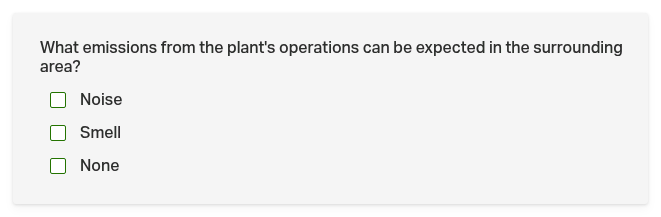
… I had to use the whole sentence in the Accessible Name:
Click role=group[name="What emissions from the plant's operations can be expected in the surrounding area?"] >> role=checkbox[name="None"]
Of course, the selector works. In fact, it’s extremely precise.
And yet I still felt uneasy whilst writing it.
A screen reader’s delight, a tester’s nightmare…
From the perspective of a (visually impaired) user, a long sentence like this is a real bonus.
After all, if the screen reader were to read out only the checkbox description, that would make no sense on its own – what is the “None” option supposed to mean?
Only with the full sentence does the user know what “None” refers to.
For the test, however, the same sentence is a ticking time bomb. 💣
Because at some point, someone will sit down and edit the wording:
# before
role=group[name="What emissions from the plant's operations can be expected in the surrounding area?"]

# afterwards
role=group[name="What kind of emissions from the plant's operation can be expected in the surrounding area?"]
#                ^^^^^^^^^^                            ^
- Meaning: identical.
- Selector: broken ❌
And here lies the crucial difference:
If the Accessible Name were simply “Emissions”, I’d bet that it would never change again – and why should it?
A full sentence, on the other hand, is editable running text with no guarantees: it belongs to the editorial team, not to the development team.
- A developer thinks twice before renaming an identifier (e.g. automation IDs).
- But someone polishing the wording of a questionnaire doesn’t even consider that a test suite might be built on top of it somewhere.
The fallacy: all or nothing
How do you resolve this dilemma?
It’s quite simple: don’t match the whole sentence, but only those parts that meet two conditions:
- They are likely to be unique for this element.
- They are likely to be permanent.
That’s the whole trick – but first, a small warning:
name attribute ≠ Accessible Name
There’s a trap lurking here that’s easy to fall into – because two completely different things happen to have the same name.
An HTML
nameattribute (for example, in<input name="email">) is a perfectly normal attribute in the source code.
The Accessible Name, on the other hand, is a value calculated by the browser, which can be derived from several sources – I’ve described this in detail in the first part.
What does this mean for the selectors?
| Expression | matches … |
|---|---|
//*[@name="…"] (XPath) | the HTML attribute name |
[name*="…"] (CSS) | the HTML attribute name |
role=…[name="…"] | the calculated Accessible Name |
In my government form, the attribute didn’t exist at all.
The name was generated via aria-labelledby from a different element.
The obvious workaround would now be to match the aria-labelledby references directly:
//*[@aria-labelledby="..."]
That works – but it’s a step backwards: because by doing so, you’re once again tying your test to a single source for the name calculation – and, on top of that, to an ID that may be generated.
It is exactly the same mistake I described in the first part regarding direct access to aria-label: as soon as a developer changes the source, the test fails – even though nothing has changed for the user.
The good news is that you don’t need this workaround at all.
Partial matching in the role strategy
For partial matching, you need neither XPath nor CSS.
The role locator can do this by default – based on the calculated name, not on an attribute.
I’d previously assumed that name= only performed an exact match.
But thanks to René Rohner’s help, I now know that’s not true.
Here’s a complete overview of what you can do with name= – let’s take a button whose Accessible Name is “Save As”:
role=button[name="Save As"]    exact match (default, even without quotes)
role=button[name*="ave"]       *=  contains
role=button[name^="Sa"]        ^=  starts-with
role=button[name$="As"]        $=  ends-with
role=button[name~="Save"]      ~=  whitespace-separated word match
role=button[name|="Save"]      |=  dash match ("Save" or "Save-As", not "Save As")
role=button[name="save as"i]   case-insensitive flag
role=button[name=/^Save.*/]    regex (with flags, e.g. /save/i)
These eight lines are the reason why this article exists. 😊
Once you’re familiar with these options, the question “Is this Accessible Name useful?” no longer arises in this form.
From now on, you’ll simply ask:
Which part of this name is unchangeable?
And then you’ll write selectors like this, for example:
Click role=group[name=/.*emissions.*expected.*surrounding area.*/i] >> role=checkbox[name="None"]
The recipe
So the recipe is: Break down an excessively long Accessible Name into two types of words.
Let’s take this sentence from the government form again:
“What emissions from the plant’s operations can be expected in the surrounding area?”
And sort out what survives and what doesn’t:
| Survives reformulation | Does not survive |
|---|---|
emissions | What kind of |
expected | from the plant’s operations |
surrounding area | Sentence structure, articles, singular/plural |
The logic behind this is simple:
- Technical terms are the reason this field exists in the first place. They only change if the subject matter changes – and then your test should fail.
- Everything else is phrasing. And phrasing is, after all, often revised.
The optimised selector therefore matches the technical terms in their order, not the sentence:
# ❌ fails on the next text revision
role=group[name="What emissions from the plant's operations can be expected in the surrounding area?"]

# ✅ survives it
role=group[name=/.*emissions.*expected.*surrounding area.*/i]
Note: The
iat the end of the regex is the flag for case-insensitive. Handy if someone changes “Emissions” to “emissions”.
A handy side effect (you might disagree, but I think it’s good): the second selector is also much easier to read. Anyone reading it can immediately see what the field is actually asking – whereas the long sentence had to be read through first.
The downside: being too vague isn’t a solution either
Hey, I’m not trying to sell a miracle cure here… The more vague your selectors become, the more likely they are to match multiple elements – and then the test fails for the opposite reason.
A very effective countermeasure is already included in the example above: chaining with >>, which I described in the first part.
Click    role=group[name=/.*emissions.*expected.*/i] >> role=checkbox[name="None"]
#        └─ imprecise container ───────────────────┘    └─ exact target element ─┘
This results in a pattern that is useful far beyond this specific case:
- The container is targeted “imprecisely” (it contains the long, editable text).
- The target element within it is targeted precisely (it usually has a short, stable label such as “None”, “Yes”, “Save”).
The long sentence therefore serves only to locate the correct area of the page.
The actual interaction hinges on a short name – exactly the sort I recommended to you in the first part.
What I’ve learnt from this case
I struggled with whether I should amend the first article.
But I decided against it. Because the recommendation to use the Accessible Name is still correct.
Let’s summarise here instead what needs to be added:
1. The top spot in the ranking is subject to a condition.
role=…[name="..."] is not automatically robust. Before you use an Accessible Name, check it:
- Is it short?
- Is it a term – or a phrase?
- Is it linked to the visible text?
- Is it translated text? (In which case you’ll need variables anyway – see the bonus section in the first part.)
If the check fails, that’s no reason to change your strategy – rather, it’s the cue to carve out the invariant core.
2. The most important sentence
If there’s one thing you should take away from this article, it’s this sentence:
role=is a strategy, not a seal of approval.
Robustness doesn’t lie inrole=. It lies inname.
And one more punchline
The first part ended with the idea of “fragility as a feature”: if your test fails because an element has no Accessible Name at all, you’ve just found a genuine accessibility bug.
This case here is the continuation – and perhaps even the more interesting half:
The page is exemplary in terms of accessibility. The detailed sentence is a real boon for screen reader users.
And nevertheless, the selector is fragile.
Good accessibility and a good selector are not the same goal.
They usually overlap – but not always.
Text that has been optimised for humans is not automatically a good identifier for machines.
Where the two diverge, it’s your job to extract the part of the text that carries meaning.
My heartfelt thanks go to René Rohner and S.K., who contributed so enthusiastically to the discussion.
➛ Back to Part 1: Don’t just copy, understand